

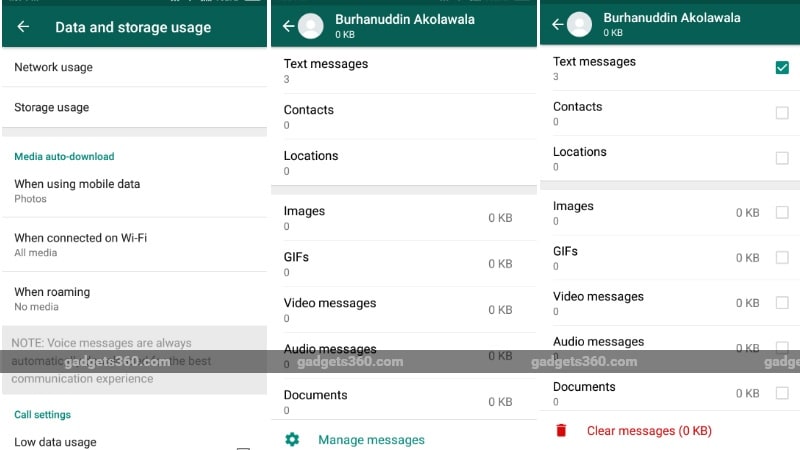
WhatsApp Beta for Android now gives users granular control to clean up data consuming your phone’s storage space. Part of the Storage Usage menu on WhatsApp, the feature has been around on iPhones since January this year, and has finally made it to Android, albeit for beta users only. With this feature, WhatsApp users will be able to see exactly how much data a group/chat is consuming, and which type of files take up the most storage space. Moreover, users will be able to delete the data hogging files from the same interface, which will help them save storage space on the phone.
How WhatsApp Storage Usage granular controls work
To use this feature on Android, you need to be on the latest beta – v2.17.340. Head to Settings -> Storage Usage on your Android beta app and clear all the unwanted space-hoarding files easily. In this menu, WhatsApp will let you choose message types, such as videos, text, images, GIFs, voice messages, etc. from specific chats – here you can delete exactly what you want and keep the rest.
Once you select the chat you want to clear, there will be a ‘Manage messages’ option at the bottom of the screen. Clicking on it will let you select the content that you want to delete, for example, you can choose to delete all GIFs and videos from a specific chat to free up space, or just delete all the text messages and let the other content remain.

WhatsApp Storage Usage granular control are only in beta stage on Android
Mind you, this feature is still in beta, and hasn’t arrived on the stable version yet. Sign up for the Android Beta Program or install the APK Mirror to use the feature right away. With the feature now in beta, it is likely that it will be released for everyone else soon.
New WhatsApp features
It is among the slew of features WhatsApp has introduced this year, while some more are rumoured to be on the way. Among the biggest changes was the debut of the photo/video-based Status, in-app YouTube playback, two-step verification, text-only statuses in colour, photo bundling, video streaming, photo filters, night mode in camera, Quick Reply button, Pinned Chats, live location sharing, and verified profiles for businesses. Integration with UPI is also expected soon, but the most anticipated WhatsApp feature of 2017 will be the ‘Delete for Everyone’ option that will let you un-send messages.
[“source=gadgets.ndtv”]
