

Around it goes! LG’s rolling bot will keep watch on your home … at least until the stairs
Similar
- Mobile
View the transcript
More Mobile

Review: Meet the Nextbit Robin, an Android phone that never lets you run out of space (2:46)

Most Memorable Moments of MWC 2015 (3:23)

Samsung Galaxy S7 rumor roundup(5:02)

When are VR and AR coming to my iPhone? (2:05)

Cat S60 is the first smartphone with infrared imaging (1:50)

Facebook plans Internet drone tests, says Mark Zuckerberg (2:06)

Now Playing
LG’s nifty rolling robot trundles around (1:32)
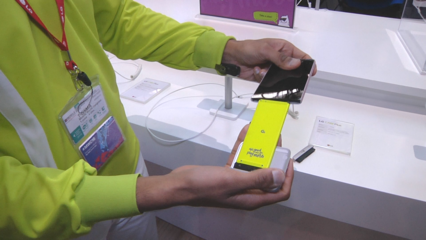
LG’s smartphone modules explained(1:16)

Samsung S7 and S7 Edge unveil in under 3 minutes (2:52)

All you need to know about the Samsung S7 and S7 Edge (1:09)

Hands on with the Samsung Galaxy S7 and S7 Edge (3:27)

LG G5 unveiling highlights (2:37)
Review: Meet the Nextbit Robin, an Android phone that never lets you run out of space (2:46)
Most Memorable Moments of MWC 2015 (3:23)
Samsung Galaxy S7 rumor roundup(5:02)
When are VR and AR coming to my iPhone? (2:05)
Cat S60 is the first smartphone with infrared imaging (1:50)
Facebook plans Internet drone tests, says Mark Zuckerberg (2:06)
Popular

Security
A low-tech way to avoid NSA spying(1:16)

Social
TechTip: Hiding updates, photos from your Facebook profile (1:12)

Software
Windows 7 Reinstall

Cloud
How to use pinned tabs to keep your browser organized (1:06)

Mobile
Change the voice your Android phone uses for navigation (1:07)

How to change the default font in Microsoft Word

Social
How to quit Facebook (1:43)

Tech Tip: Getting a password manager (1:27)

Cloud
How to selectively delete browsing history

Software
Quick tips for OS X’s Spotlight (3:03)

IT Insights
Tech Tip: Disabling Gmail’s inbox sorting (0:52)

Tech Tip: Share real-time location with Glympse (1:07)
Security
A low-tech way to avoid NSA spying(1:16)
Social
TechTip: Hiding updates, photos from your Facebook profile (1:12)
Software
Windows 7 Reinstall
Cloud
How to use pinned tabs to keep your browser organized (1:06)
Mobile
Change the voice your Android phone uses for navigation (1:07)
How to change the default font in Microsoft Word
Featured videos from IDG.tv

Hardware & Accessories
Hands on: LG 360 VR and 360 Cam(3:19)

Hardware & Accessories
Hands-on with the Huawei MateBook, its clever MatePen, and all the accessories (2:06)

Mobile
What’s the difference between the Galaxy S6 and Galaxy S7? (2:38)
- Our Partners
- IDG.TV
- CIO
- COMPUTERWORLD
- CSO
- GREENBOT
- INFOWORLD
- ITWORLD
- MACWORLD
- [“source -pcworld”]
